Live captions and translation on any website
Add real-time subtitles and live translation to any website. AI captions for videos, meetings, streams, and more.
How it works
Get live real-time captions and translation on any website in three quick steps.
Get Soniox Browser Extension
Install from Chrome Web Store, pin it in your extension bar, and open the side panel on any tab.
Pick a language and record
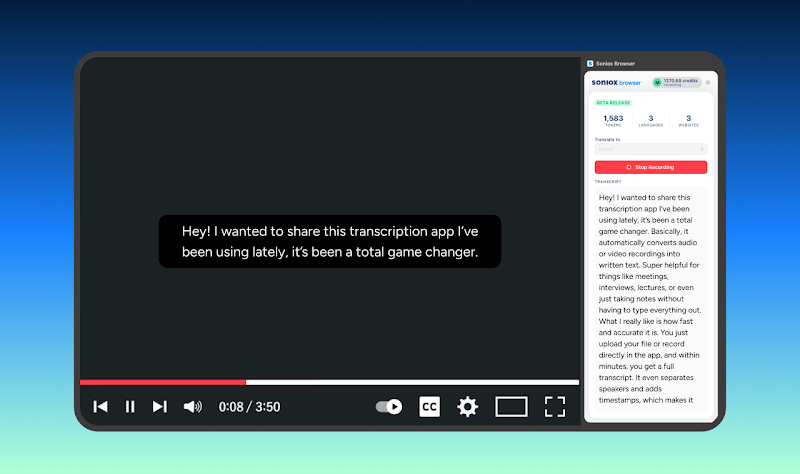
Choose the language you want to see captions in, press record button and give permission to capture audio.
See captions instantly
A sleek, draggable caption overlay appears right on the page as people speak.
Everything you need to follow any conversation
Soniox Browser Extension uses state-of-the-art speech recognition to deliver fast, accurate transcription and translation directly in your browser.
Live captions
Real-time transcription displayed as a draggable overlay on any webpage.
Live translation
Translate speech into your preferred language as it happens.
60+ languages
Broad language support with automatic language detection.
Speaker identification
Distinguish between different speakers in the audio.
Works everywhere
Captures audio from any tab on any website. Videos, webinars, streams, and meetings.
Built on Soniox AI
Powered by state-of-the-art speech AI models developed by Soniox for fast, accurate transcriptions.
Use Soniox across the web
Add subtitles wherever spoken language shows up online.
Foreign-language videos
Follow along with videos in a language you’re still learning, with captions translated in real-time.
Webinars, streams, and meetings
Add subtitles to live streams, webinars, and online meetings running in your browser.
Accessibility
Improve accessibility for deaf and hard-of-hearing users by turning any spoken content into readable text.
Lectures and presentations
Transcribe lectures and presentations in the browser.
Works with your Soniox App account
Sign in with your Soniox App account to start using the extension. The same account works across Soniox App on mobile, desktop, and web.