Text-to-speech API for video voiceover and localization
Build expressive voiceovers for explainers, courses, ads, and long-form video with Soniox Text-to-Speech API. Choose from 200+ studio-quality voices or clone your own, localize across 60+ languages, and control emotion, pacing, and delivery.
$0.70 per generated hour.
Trusted by teams building global voice products





































Multilingual voiceovers without re-recording
Video localization usually means new voice talent, new recording sessions, and more production work every time a script changes. Soniox Text-to-Speech API turns localized scripts into expressive voiceovers across 60+ languages while keeping the same narrator, voice identity, and creative direction.
Control emotion and delivery
Use audio tags to shape emotion, pace, volume, pitch, and vocal delivery for each line, from a calm product walkthrough to a tense documentary scene. Write the direction into the script and generate the performance you need.
Keep the same narrator across 60+ languages
Every built-in and cloned Soniox voice can speak all 60+ supported languages. Localize a video for new markets while preserving the same narrator identity, style, and voice across every version.





















































Pronounce names and terms correctly
Localized scripts still contain product names, people, places, acronyms, and technical terminology. Soniox handles foreign and domain-specific terms naturally within the surrounding speech, without breaking the narration into separate requests.
Your reservation is confirmed. Cuando llegues al hotel, muestra este código en recepción: ES-4928.
Your order is ready for pickup. 店頭で注文番号 A-7392 をお見せください.
The deployment completed successfully. Bitte prüfen Sie jetzt die Produktionsumgebung und bestätigen Sie, dass alles funktioniert.
Open the Soniox Developer Console, select Text-to-Speech, and set the output to 24-kilohertz PCM before deploying on Kubernetes.
The workload runs on NVIDIA H100 GPUs.
Our Asian engineering office is located in Guangzhou.

Clone your narrator or brand voice
Clone a presenter, host, creator, or brand voice from a short audio sample, then use the same voice across videos and languages. Soniox preserves the speaker’s identity, accent, rhythm, and expressive character.


Fit the voiceover to the edit
Adjust pacing and reduce unnecessary pauses while keeping the narration natural and fluent. Useful when localized speech needs to fit an existing scene, sequence, or shorter cut.
From source video to localized voiceover
Combine Soniox Speech-to-Text and Text-to-Speech APIs to build a multilingual video localization and dubbing workflow from transcription to finished voiceover.
Transcribe
Transcribe the original video audio with Soniox Speech-to-Text API and translate it into the languages you need.
Script
Review each localized script and add audio tags where a line needs a specific emotion, pace, or delivery.
Generate
Send each script to Soniox Text-to-Speech API with a built-in or cloned voice and receive production-ready audio in the format your workflow expects.
Publish
Add the generated voiceover to your video timeline and use character-level timestamps to align captions, highlights, subtitles, and other on-screen elements.
Voiceover API features built for production
Build video voiceover pipelines with control over performance, voice identity, output format, timing, and multilingual generation.
Audio tags
Control emotion, volume, pace, and pitch inline with tags like [softly], [slowly], or [excited]. Tags are written in English for every script language.
Voice cloning
Create a voice from a reference clip in Soniox Console or through the API, then use its voice ID like any built-in voice across every supported language.
Explore voice cloningProduction audio formats
Generate WAV, FLAC, MP3, AAC, Opus, or raw PCM at sample rates up to 48 kHz, ready for video editing and publishing.
Explore audio formatsCharacter-level timestamps
The WebSocket API returns start and end times for every spoken character, so you can align captions, subtitles, highlights, and on-screen text with the generated voiceover.
Explore timestampsSpeech infrastructure for massive scale
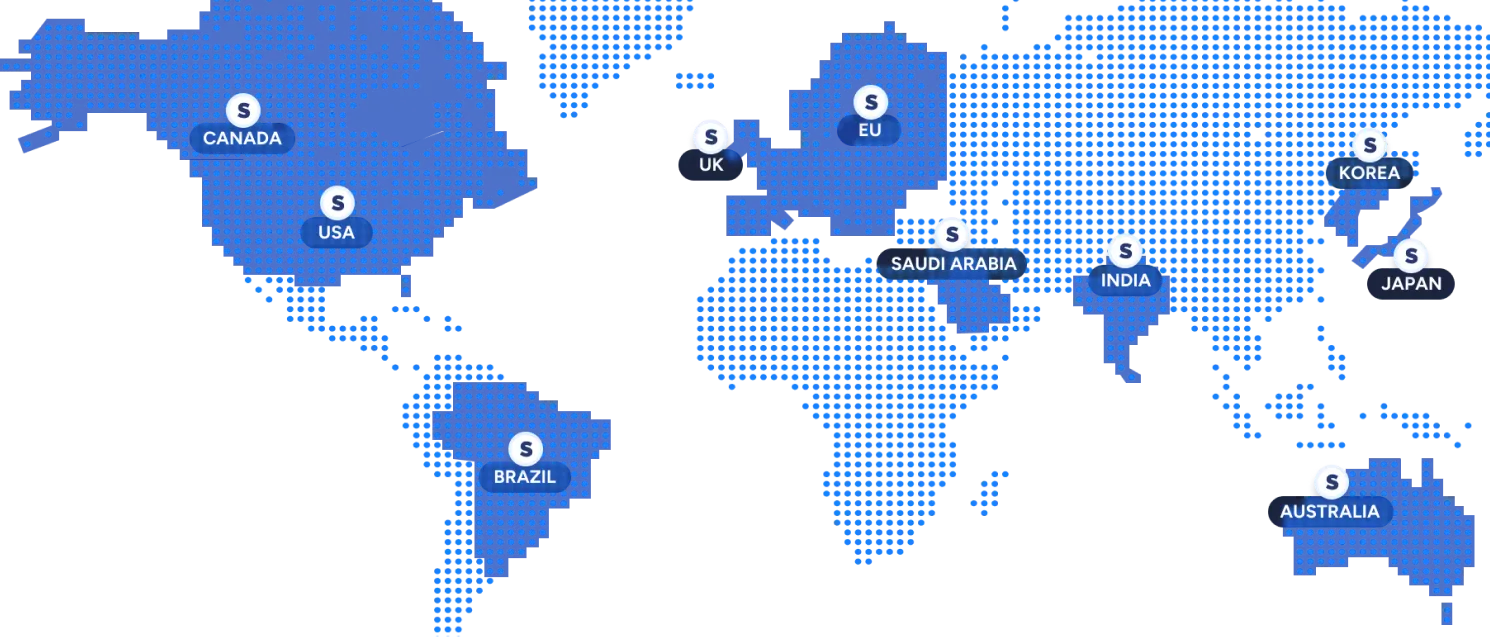
Build on one API and deploy in your region
Use the same models and API everywhere, with in-region processing to meet latency, data residency, and regulatory requirements.
Available: US, EU, Japan, India
Coming soon: Korea, Australia, Canada, Saudi Arabia, UK, Brazil
Run mission-critical systems with confidence
- 99.9% uptime
Production-hardened infrastructure with monitoring and redundancy. - low-latency streaming
Process speech in real time with low latency for responsive voice applications. - Priority support
Severity-based incident response with direct access to the Soniox team.

"Before Soniox, our international users always had a noticeably different experience. Now accuracy and responsiveness match across all regions…it feels like one system instead of five."
Alon Yair CTO of Onvego
Build voiceover into every video workflow
Add AI voiceover and multilingual narration to video editors, localization platforms, e-learning products, marketing tools, and automated content pipelines.
Explainer and product videos
Narrate product demos, walkthroughs, and feature launches, then regenerate the voiceover whenever the product or script changes.
E-learning and training
Voice course modules and training videos in every language your learners speak, without re-recording each update.
Marketing and social video
Produce ad and social variants for each market with one consistent brand voice across every language.
Documentaries and long-form video
Generate expressive narration for long scripts and direct the delivery scene by scene with audio tags.
Video localization and dubbing
Turn translated scripts into consistent multilingual voiceovers for localization and dubbing workflows without re-recording every market.
Video editors and creation tools
Let creators turn scripts into voiceovers directly inside your video editor, creative tool, or publishing platform.
Privacy and compliance, built right in
Never stored, never saved.
Audio stays in memory, everything is processed in real-time.
Built for privacy-critical use cases.
Adhering to leading global security, privacy, and compliance standards.
Trusted where privacy matters most.
Used in industries where speech is sensitive, from healthcare to enterprise.




Frequently asked questions about AI video voiceovers
What is an AI voiceover API?
An AI voiceover API converts written scripts into generated narration that applications can use in video, e-learning, advertising, localization, and other media workflows.
Soniox Text-to-Speech API generates expressive voiceovers across 60+ languages using built-in or cloned voices, with programmatic control over delivery, audio format, and timing.
Can I use Soniox as a video localization API?
Soniox provides the speech layer for video localization rather than a complete video editing or lip-sync platform. Soniox Speech-to-Text API can transcribe and translate source speech, while Soniox Text-to-Speech API generates the localized voiceover.
Your application can combine that audio with its own video editing, timing, subtitle, dubbing, or publishing workflow.
Can I localize one video into multiple languages?
Yes. Every Soniox voice speaks all 60+ supported languages, so the same narrator can voice each localized version of a video.
Send the translated script for each language to Soniox Text-to-Speech API. To transcribe and translate the source audio, you can use Soniox Speech-to-Text API.
Which voices can I use for AI video voiceovers?
Soniox offers 200+ built-in studio-quality voices spanning different ages, accents, styles, and vocal characteristics.
Every built-in voice works across all 60+ supported languages, or you can create a custom voice clone from your own narrator, presenter, creator, or brand voice.
Can I use my own narrator's voice?
Yes. Upload a clean reference clip of up to 20 seconds of audio through Soniox Console or the API. You get back a voice ID that works like a built-in voice.
The cloned voice works across all 60+ supported languages, so a presenter or brand voice can carry into every localized version.
How do I control emotion and delivery?
Add audio tags to the script. Tags control emotion, volume, pace, pitch, and voice quality, for example [whispering], [slowly], or [low voice].
Tags are always written in English, even when the script is in another language.
How does Soniox handle brand names and terms in localized scripts?
Which audio formats can I export?
Can I sync the voiceover with captions or on-screen text?
How much does a video voiceover cost?
Voice every video in every language
Build expressive AI voiceovers and localized narration across 60+ languages with built-in or cloned voices, precise timing, and production-ready audio from Soniox Text-to-Speech API.