Automatic language detection
for multilingual speech
Transcribe 60+ languages without choosing one first. Soniox identifies the spoken language, follows code-switching within a sentence or conversation, and tags every token with its language.
$0.10/hour async · $0.12/hour real-time · language identification included
Start the demo and switch languages while you speak. A new language label appears each time the language changes.
Trusted by teams building global voice products





































A language label on every token
Soniox identifies language at the token level while keeping labels coherent within each sentence. A word from another language can keep the sentence’s label, while a new sentence in another language gets its own label.

“It just gets the words right, any language, any accent, any context. That’s what accuracy is supposed to look like.”
Tony Wang, Cofounder & Chief Revenue Officer at AgoraPer-token language labels
Read the language field on each token to split, route, or display a transcript by language.
Code-switching in one stream
Speakers can switch languages between sentences or inside one. One multilingual model keeps transcribing, with no restart and no second model.
60+ languages, no preset list
Language identification works in every supported language. You do not have to declare languages before the audio starts.
Detect, hint, or restrict languages
Three request parameters control language handling. Label every token, bias recognition toward the languages you expect, or restrict output when the language is already known.
enable_language_identificationLanguage identification
Add a language code to every token. It works for any supported language and needs no setup beyond the flag.
language_hintsLanguage hints
List the languages you expect. Hints bias recognition toward them and improve accuracy, while other languages can still be detected.
language_hints_strictLanguage restriction
Strongly prefer output in the hinted languages only. It works best with a single language and is best-effort, not a hard guarantee.
Real-time or async language detection
The same flag works in the real-time and async APIs. Use real-time when you need language labels while people talk, and async for recorded audio.
Real-time language detection
Language labels stream with each token for live captions, voice agents, and calls. With less context available, a label can be revised as more speech arrives.

Async language detection
The model processes the complete recording, so every language label has the full audio context. Use it for recorded calls, meetings, interviews, and media.
Enable language identification with one flag
Set the flag in the request and read the language field on each token. Add language hints when you know which languages to expect.
Request
{
  "model": "stt-rt-v5",
  "enable_language_identification": true
}
Output tokens
{"text": "How",     "language": "en"}
{"text": " are",    "language": "en"}
{"text": " you",    "language": "en"}
{"text": "?",       "language": "en"}
{"text": "Gu",      "language": "de"}
{"text": "ten",     "language": "de"}
{"text": " Morgen", "language": "de"}
{"text": "!",       "language": "de"}
{"text": "Cómo",    "language": "es"}
{"text": " está",   "language": "es"}
{"text": " every",  "language": "es"}
{"text": "one",     "language": "es"}
{"text": "?",       "language": "es"}
Language detection in Python
from soniox import SonioxClient
from soniox.types import RealtimeSTTConfig
from soniox.utils import start_audio_thread, throttle_audio

client = SonioxClient()
config = RealtimeSTTConfig(
    model="stt-rt-v5",
    audio_format="mp3",
    enable_language_identification=True,
)

audio = throttle_audio("conversation.mp3", delay_seconds=0.1)

with client.realtime.stt.connect(config=config) as session:
    start_audio_thread(session, audio)

    current_language = None
    for event in session.receive_events():
        for token in event.tokens:
            if not token.is_final:
                continue
            if token.language != current_language:
                current_language = token.language
                print(f"\n[{current_language}]", end="")
print(token.text, end="", flush=True)Code-switching across 60+ languages
Language switches work between any supported languages, with one model and the same parameter. No per-language setup.
Spanish
Hindi
Chinese
Compare real-time language identification
Compare language identification, language hints, and multilingual model support across each provider’s real-time model.
| Feature | Soniox stt-rt-v5 | OpenAI gpt-4o-transcribe | Google gemini-3.5-transcribe-live | Azure en-US-Conversation | Speechmatics enhanced | Deepgram nova-3 | AssemblyAI Universal-3.5 Pro | Cartesia ink-2 | ElevenLabs Scribe v2 Realtime | Meta muse-voice-transcribe-1.0 | Smallest AI Pulse | xAI grok-voice-transcribe-2.0 | Inworld inworld-stt-1 |
|---|---|---|---|---|---|---|---|---|---|---|---|---|---|
| Language identification | |||||||||||||
| Language hints | |||||||||||||
| Single multilingual model |
Per token, not per utterance
Some models report one language per utterance, so a code-switched utterance carries a single label. Soniox labels each token.
Any supported language
Some providers only detect from a short list of candidate languages you supply. Soniox identifies any supported language, and hints are optional.
No add-on fee
Language identification is included in the Soniox hourly rate, along with speaker diarization and smart formatting.
Built for multilingual audio
Use language-labeled transcripts in products where speakers move between languages.
Voice agents
Detect the caller’s language as they speak and answer in the same language, without asking them to pick one first.
Call centers
Transcribe customers who switch languages mid-call, with a language label on every token for QA and analytics.
Speech translation
Identify the spoken language as it changes during real-time speech translation.
Meeting notes
Keep multilingual meetings in one transcript, with a language label on every token.
Media and captions
Caption interviews, podcasts, and broadcasts where guests move between languages.
Medical transcription
Capture clinician and patient speech when a visit moves between languages.
Speech infrastructure for massive scale
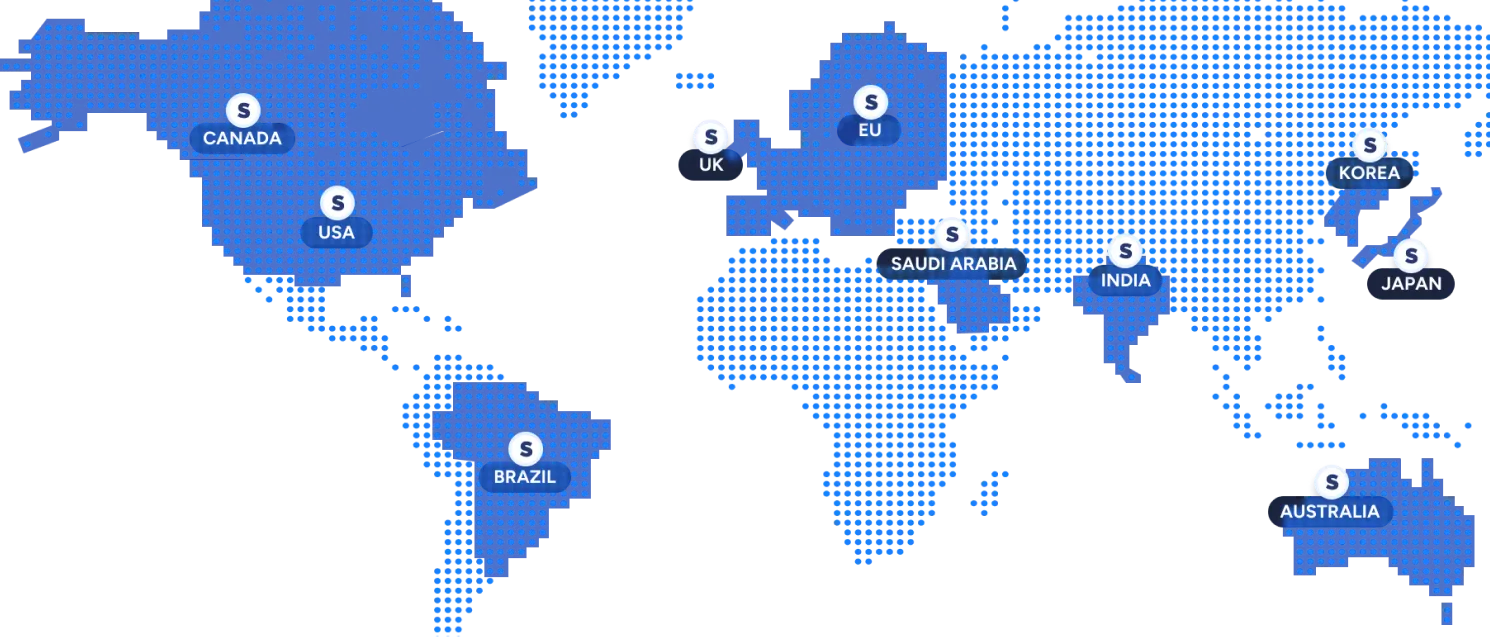
Build on one API and deploy in your region
Use the same models and API everywhere, with in-region processing to meet latency, data residency, and regulatory requirements.
Available: US, EU, Japan, India
Coming soon: Korea, Australia, Canada, Saudi Arabia, UK, Brazil
Run mission-critical systems with confidence
- 99.9% uptime
Production-hardened infrastructure with monitoring and redundancy. - low-latency streaming
Process speech in real time with low latency for responsive voice applications. - Priority support
Severity-based incident response with direct access to the Soniox team.

"Before Soniox, our international users always had a noticeably different experience. Now accuracy and responsiveness match across all regions…it feels like one system instead of five."
Alon Yair CTO of Onvego
Language identification included in the hourly rate
Choose real-time or async transcription and set your monthly audio volume. Language detection has no add-on fee.
Pricing calculator
Stop overpaying for speech AI
1,000 hours of audio / month
Pricing assumptions
Based on public pay-as-you-go pricing. Enterprise discounts and committed-use contracts may differ. Some providers charge separately for certain features. The calculator uses the public price for the provider configuration that most closely matches Soniox.
Privacy and compliance, built right in
Never stored, never saved.
Audio stays in memory, everything is processed in real-time.
Built for privacy-critical use cases.
Adhering to leading global security, privacy, and compliance standards.
Trusted where privacy matters most.
Used in industries where speech is sensitive, from healthcare to enterprise.




Frequently asked questions about language detection
What is automatic language detection?
What is code-switching in speech recognition?
Does Soniox support code-switching ASR?
How do I enable language detection?
enable_language_identification to true in your request. In the Python SDK, pass enable_language_identification=True to RealtimeSTTConfig and read token.language. See the language identification docs.Do I need to specify the language in advance?
language_hints to improve accuracy. Hints bias the model without blocking other languages.What is the difference between language hints and language restrictions?
language_hints_strict restricts output to the hinted languages on a best-effort basis. Restriction works best with one language and is meant for cases where the language is already known, for example to avoid transcribing accented speech in the wrong script.Does language detection work in real time?
Which languages can Soniox detect?
Does Soniox support Hinglish speech to text?
["hi", "en"] as language hints to bias recognition toward the pair.How is Soniox different from Whisper language detection?
Is Soniox an alternative to Deepgram language detection?
Does language detection cost extra?
How do I get started?
Ready to get started?
Create an account instantly, or contact us to design a custom package for your business.
Build with APIDocumentation
Get up and running in minutes and spend your time building, not wrestling with the API.
Explore docsSee what you’ll pay
Pay only for what you use with our flexible pricing. Built to scale with you.
Pricing details