OtherGuides

Direct stream

Stream directly from microphone to Soniox Speech-to-Text WebSocket API to minimize latency.

Overview

Applies to Text-to-Speech and Speech-to-Text. Examples use Speech-to-Text.

This guide walks you through capturing and transcribing microphone audio in real time using the Soniox WebSocket API — optimized for the lowest possible latency.

The direct stream approach enables the browser to send audio directly to the Soniox WebSocket API over a WebSocket connection, eliminating the need for any intermediary server. This results in faster transcription and a simpler architecture.

Soniox's Web SDK (@soniox/client) handles everything client-side — capturing microphone input, managing the WebSocket connection, and authenticating using temporary API keys.

Use this setup when you want real-time speech-to-text performance directly in the browser with minimal delay.
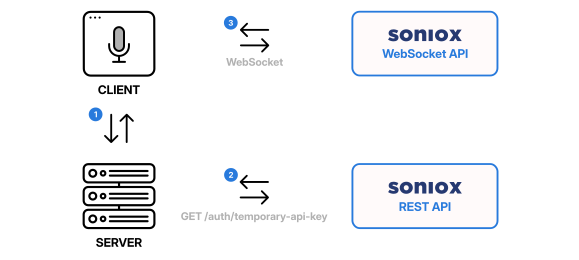
Soniox Speech-to-Text direct stream flowchart

Temporary API keys

Temporary API keys (obtained from the REST API) are required solely to establish the WebSocket connection. Once the connection is established, it will be kept alive as long it remains active. The expires_in_seconds configuration parameter should be set to a short duration.

Following parameters are required to create a temporary API key:

{
  "usage_type": "transcribe_websocket",
  "expires_in_seconds": 60
}

To attribute browser-side traffic to an end user or session, bind a client_reference_id to the temporary API key — it is recorded in usage logs for every request authenticated with the key. Clients cannot override it.

API request limits apply when creating temporary API keys. See Limits section in the Soniox Console.


Example

This is an example of a browser-based transcription, but same principle applies to any other type of client - you minimize latency by connecting the client directly to the WebSocket API using a temporary API key.

First we create a simple HTTP server that on request:

  1. Renders the index.html template.
  2. Exposes an endpoint to serve the temporary API key (/temporary-api-key).

Python server using FastAPI:

import os
from pathlib import Path

import requests
import uvicorn
from dotenv import load_dotenv
from fastapi import FastAPI, Request
from fastapi.responses import HTMLResponse, JSONResponse
from fastapi.templating import Jinja2Templates

load_dotenv()

templates = Jinja2Templates(directory=Path(__file__).parent / "templates")

app = FastAPI()


@app.get("/", response_class=HTMLResponse)
async def get_index(request: Request):
    return templates.TemplateResponse(
        request=request,
        name="index.html",
    )


@app.get("/temporary-api-key", response_class=JSONResponse)
async def get_temporary_api_key():
    try:
        response = requests.post(
            "https://api.soniox.com/v1/auth/temporary-api-key",
            headers={
                "Authorization": f"Bearer {os.getenv('SONIOX_API_KEY')}",
                "Content-Type": "application/json",
            },
            json={
                "usage_type": "transcribe_websocket",
                "expires_in_seconds": 60,
            },
        )

        if not response.ok:
            raise Exception(f"Error: {response.json()}")

        temporaryApiKeyData = response.json()
        return temporaryApiKeyData
    except Exception as error:
        print(error)
        return JSONResponse(
            status_code=500,
            content={"error": f"Server failed to obtain temporary api key: {error}"},
        )


if __name__ == "__main__":
    port = int(os.getenv("PORT", 8000))
    uvicorn.run(app, host="0.0.0.0", port=port)

Node.js server using Express:

import "dotenv/config";
import express from "express";
import path from "path";
import { fileURLToPath } from "url";

const __dirname = path.dirname(fileURLToPath(import.meta.url));
const app = express();

app.get("/", (req, res) => {
  res.sendFile(path.join(__dirname, "templates/index.html"));
});

app.get("/temporary-api-key", async (req, res) => {
  try {
    const response = await fetch(
      "https://api.soniox.com/v1/auth/temporary-api-key",
      {
        method: "POST",
        headers: {
          Authorization: `Bearer ${process.env.SONIOX_API_KEY}`,
          "Content-Type": "application/json",
        },
        body: JSON.stringify({
          usage_type: "transcribe_websocket",
          expires_in_seconds: 60,
        }),
      },
    );

    if (!response.ok) {
      throw await response.json();
    }

    res.json(await response.json());
  } catch (error) {
    console.error(error);
    res.status(500).json({
      error: `Server failed to obtain temporary api key: ${JSON.stringify(error)}`,
    });
  }
});

app.listen(process.env.PORT, () => {
  console.log(`HTTP server listening on http://0.0.0.0:${process.env.PORT}`);
});

Our HTML client template contains a single "Start" button, that when clicked:

  1. Requests microphone permissions.
  2. Calls the /temporary-api-key endpoint to obtain a temporary API key.
  3. Creates a SonioxClient whose config function returns the temporary API key.
  4. Connects to the WebSocket API.
  5. Starts transcribing from microphone input and renders transcribed text into a div in real-time.
<!DOCTYPE html>
<html>

<body>
  <h1>Browser direct stream example</h1>
  <button id="trigger">Start</button>
  <hr />
  <div>
    <span id="final"></span>
    <span id="nonfinal" style="color: gray"></span>
  </div>
  <div id="error"></div>
  <script type="module">
    // import Soniox Web SDK
    import { SonioxClient } from "https://unpkg.com/@soniox/client?module";

    const finalEl = document.getElementById("final");
    const nonFinalEl = document.getElementById("nonfinal");
    const errorEl = document.getElementById("error");
    const trigger = document.getElementById("trigger");

    // the SDK calls config before each session to get a fresh temporary API key from our server
    const client = new SonioxClient({
      config: async () => {
        const response = await fetch("/temporary-api-key");
        const data = await response.json();
        if (!data.api_key) {
          throw new Error(data.error || "Error fetching temp api key.");
        }
        return { api_key: data.api_key };
      },
    });

    let recording;
    let recordingState = "stopped"; // "stopped" | "starting" | "running" | "stopping"

    trigger.onclick = async () => {
      if (recordingState === "stopped") {
        finalEl.textContent = "";
        nonFinalEl.textContent = "";
        errorEl.textContent = "";
        trigger.textContent = "Starting...";
        recordingState = "starting";

        let finalText = "";

        // start capturing the microphone and transcribing
        recording = client.realtime.record({
          model: "stt-rt-v5",
          language_hints: ["en"],
        });

        recording.on("connected", () => {
          // SDK connected to Soniox STT WebSocket API and is transcribing
          recordingState = "running";
          trigger.textContent = "Stop";
        });

        recording.on("result", (result) => {
          // render the transcript
          let nonFinalText = "";

          for (const token of result.tokens) {
            if (token.is_final) {
              finalText += token.text;
            } else {
              nonFinalText += token.text;
            }
          }

          finalEl.textContent = finalText;
          nonFinalEl.textContent = nonFinalText;
        });

        recording.on("error", (error) => {
          console.log("Error occurred", error);
          errorEl.textContent = error.message;
          resetTrigger();
        });
      } else if (recordingState === "running") {
        // stop transcribing and wait for the final results
        trigger.textContent = "Stopping...";
        recordingState = "stopping";
        await recording.stop();
        resetTrigger();
      }
    };

    function resetTrigger() {
      trigger.textContent = "Start";
      recordingState = "stopped";
    }
  </script>
</body>

</html>

Run it

Put index.html in a templates/ folder next to the server, and create a .env file:

SONIOX_API_KEY=<your API key>
PORT=8000
pip install fastapi uvicorn requests python-dotenv jinja2
python server.py
npm init -y
npm pkg set type=module
npm install express dotenv
node server.js

Open http://localhost:8000 and click Start.